
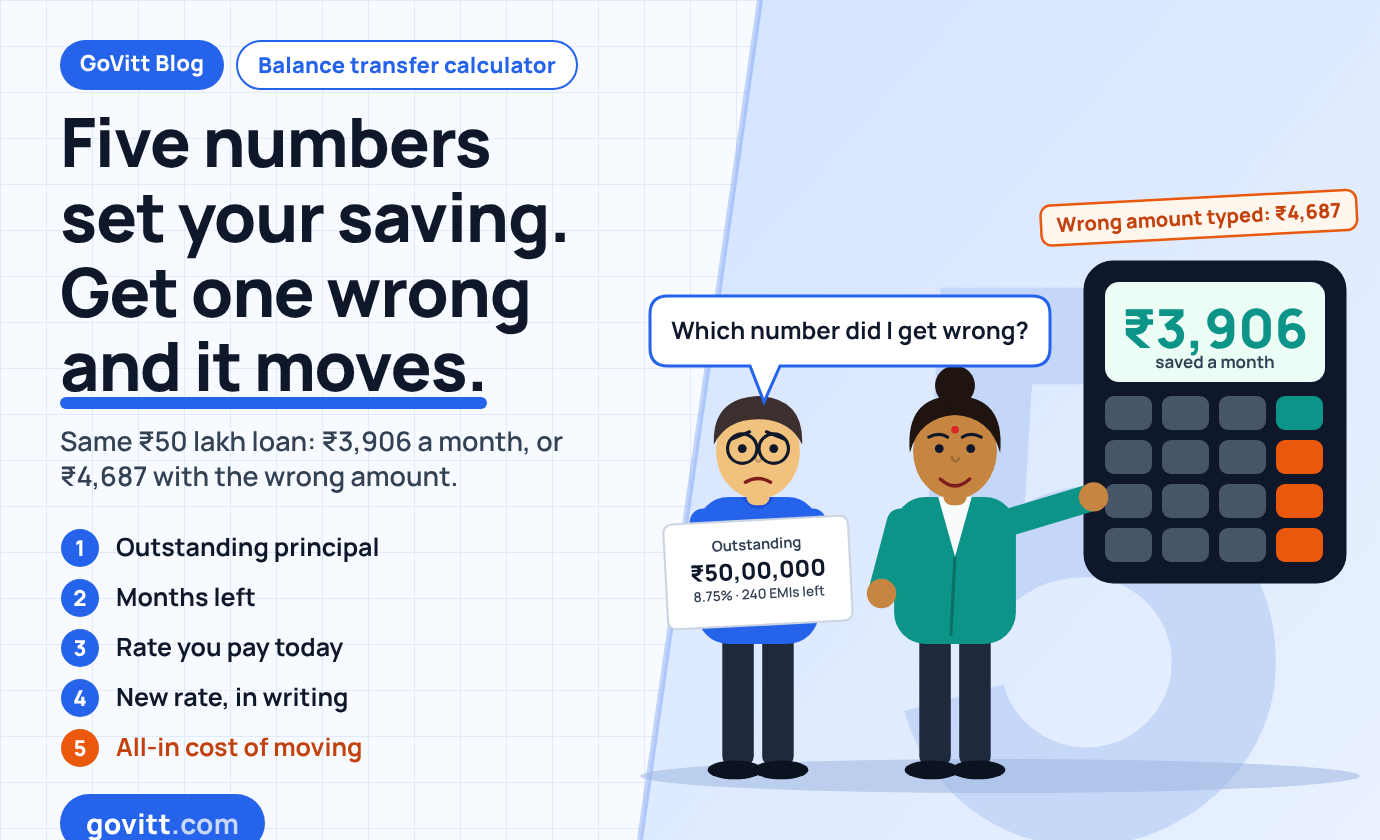
A home loan balance transfer calculator is only as good as the five numbers you type into it. Take ₹50 lakh with 20 years left, moving from 8.75% to 7.50%. The true saving is ₹3,906 a month. Type your original ₹60 lakh and the tool says ₹4,687. Type the 8.25% from your sanction letter and it says ₹2,323. Same loan, two wrong answers, and nothing on the screen tells you.
The short version: the five inputs are your outstanding principal, the months you have left, the rate you pay today, the rate the new lender will actually give you, and the all-in cost of moving. Four of them come from papers you already have. The fifth, the cost, is the one most people leave out, and it's the one that decides whether the saving is worth having. This works for any calculator, ours included.
Below: where each number comes from, what happens if you get it wrong, the formulas so you can check any tool in a spreadsheet, and three worked examples at different loan sizes.
See your real payoff date in 60 seconds
Banks calculate remaining EMIs by simple subtraction. See your actual payoff date and discover how much interest a balance transfer can save.
The five numbers, and what a wrong one does
Base case for all of it: ₹50 lakh outstanding, 20 years (240 months) left, 8.75% today, a written quote of 7.50%. The EMI falls from ₹44,186 to ₹40,280, which is ₹3,906 a month. Each row below changes one input and leaves the other four correct.
| Input | What you should type | The common mistake | Saving the tool shows | Out by |
|---|---|---|---|---|
| Right answer | All five correct | None | ₹3,906 a month | 0 |
| Outstanding principal | ₹50 lakh from the statement | ₹60 lakh, the original loan | ₹4,687 a month | ₹781 too high |
| Months left | 240 | 300, the original 25 years | ₹4,157 a month | ₹251 too high |
| Rate today | 8.75% from the latest statement | 8.25%, the sanction letter | ₹2,323 a month | ₹1,583 too low |
| New rate | 7.50%, the quote for your score | 7.25%, the poster rate | ₹4,667 a month | ₹761 too high |
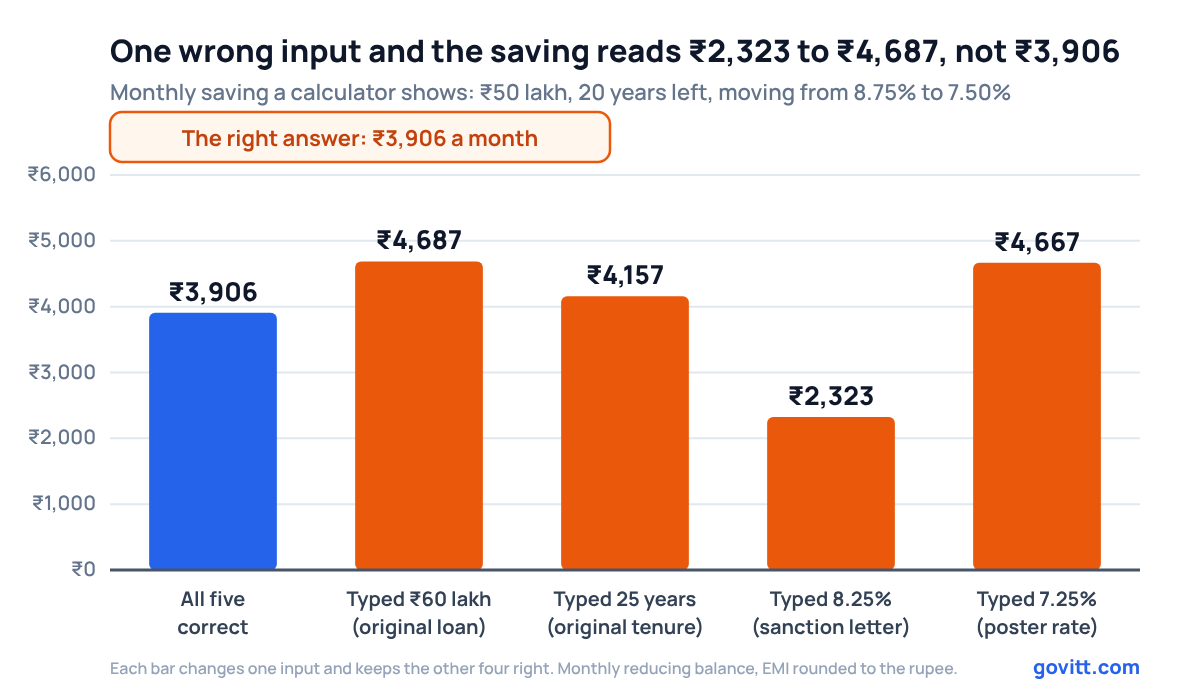
The saving moves between ₹2,323 and ₹4,687. And the fifth input, the cost, doesn't change the monthly saving at all. It changes how long you wait to see any of it.
1. Outstanding principal: the statement, not the sanction letter
Use the principal outstanding on your latest loan statement, or the figure on the foreclosure statement from your current lender. Don't use the amount you were sanctioned. You've been repaying principal, though slower than you'd think at first. Say you were sanctioned ₹57 lakh for 25 years at 8.75%, with an EMI of ₹46,862. After 60 EMIs you still owe ₹53,02,902, which is 93.0% of what you borrowed. Early EMIs are mostly interest. My post on how to read your amortisation schedule shows the split, and why your statement is the only reliable source. If you've part-prepaid, or your rate has floated, only the statement is right.
2. Months left, not the original tenure
Count the EMIs left, not the years you chose in the sanction letter. Your statement shows them. Typing 25 years for a loan with 20 left overstates the saving by ₹251 a month in the base case, which is the smallest error here. The bigger danger is the reverse. Some tools let you restart the clock at a fresh 20 years, and that makes the EMI look much lower. I come back to that trap below.
3. The rate you pay today, from the latest statement
A floating loan's rate moves. The sanction letter shows where you started. The statement shows where you are. If the letter says 8.25% and the statement says 8.75%, using the letter understates your saving by ₹1,583 a month, and you might walk away from a transfer that would have paid. If your loan is on MCLR, the rate on your statement is the one you pay until your next reset, so use it and ask the bank when the reset falls. How soon you can transfer a new loan is a separate question, and how soon can you transfer a home loan answers it.
4. The new rate: the quote for your score, in writing
A poster says "from 7.25%". That's the rate for the best score on the best loan size. Your quote might be 7.50% or 8.05% or more. Typing the poster rate overstates the saving by ₹761 a month in the base case, and by much more if your band is a step or two lower. My post on how a credit score moves your rate shows how wide the bands run, and best banks for home loan balance transfer in 2026 compares lenders. Get the number in writing, with the date it holds until, before you trust any result.
5. The all-in cost, not the processing fee
This is the input most tools don't ask for, so you have to bring it. A transfer costs more than the processing fee. In Bengaluru it also includes legal and valuation fees, a fresh MODT with stamp duty, registration and small charges. My balance transfer charges post lists every line, and the MODT post explains why you pay it again.
Here's what leaving the stamp duty out does. On the base case, SBI's processing fee with GST is ₹17,700. Divided by ₹3,906, that's a payback of 5 months. The true all-in cost is ₹53,700 to ₹76,500, which is a payback of 14 to 20 months. Same loan, and the payback looks between about three and four times faster than it is.
There's one more cost no calculator shows. Overlap interest. For the days when the new lender has paid but your old bank hasn't yet received the money, you pay interest on both. At 8.75% on ₹50 lakh that's about ₹1,199 a day.
The formulas, so you can check any calculator
You don't need to trust a tool. Three lines in a spreadsheet will reproduce its answer.
- EMI: P × r × (1 + r)^n ÷ ((1 + r)^n − 1), where P is the outstanding principal, r is the annual rate divided by 1,200 and n is the months left. In Excel or Google Sheets, =PMT(8.75%/12, 240, -5000000) returns about ₹44,186.
- Monthly saving: the EMI at your current rate minus the EMI at the new rate, both for the same months left. Here ₹44,186 minus ₹40,280 is ₹3,906.
- Break-even in months: the all-in cost divided by the monthly saving, rounded up. Here ₹53,700 ÷ ₹3,906 is 14 months, and ₹76,500 ÷ ₹3,906 is 20 months.
My rule is 24 months or less. I explain the cases that fail it in when a home loan balance transfer is not worth it.
For a bigger picture, there are two more figures worth calculating, both over the months you expect to keep the loan.
- Saving to the end of the loan, at the same tenure: the monthly saving times the months left, minus the cost. This is the number on the ad.
- Saving over a hold period, say five years. The cautious way is the monthly saving times 60, minus the cost, which counts only the EMI you save. The fuller way is the interest you save over those 60 months, minus the cost. That also counts that after five years you owe less on the new loan than on the old one. On the base case the gap is ₹75,876.
Three worked examples
All three are floating-rate loans in Bengaluru with the same-tenure transfer. Costs are the low and high ends from my charges post for each loan size, and they include an assumed processing fee. The rates are illustrations.
| ₹30 lakh, 12 years left | ₹50 lakh, 20 years left | ₹1 crore, 18 years left | |
|---|---|---|---|
| Rate today to new rate | 9.00% to 7.60% | 8.75% to 7.50% | 8.40% to 7.45% |
| EMI today | ₹34,141 | ₹44,186 | ₹89,932 |
| EMI after the transfer | ₹31,819 | ₹40,280 | ₹84,200 |
| Saving a month | ₹2,322 | ₹3,906 | ₹5,732 |
| All-in cost | ₹36,390 to ₹52,700 | ₹53,700 to ₹76,500 | ₹83,700 to ₹1,36,000 |
| Cost back in | 16 to 23 months | 14 to 20 months | 15 to 24 months |
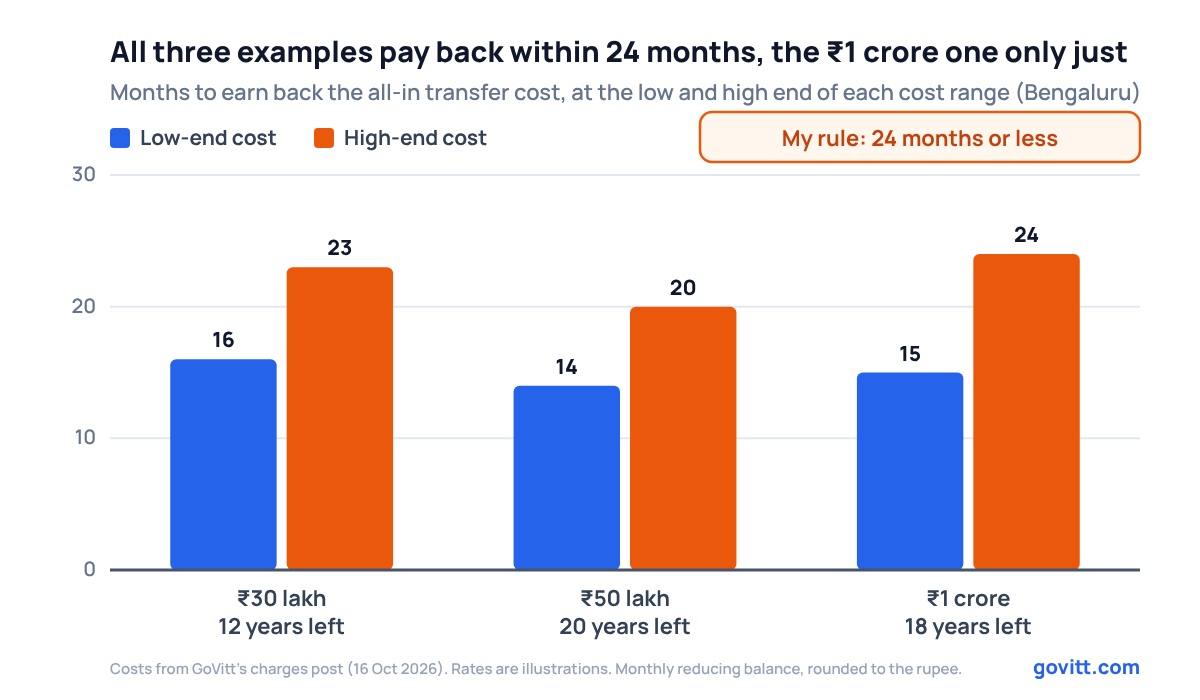
All three pass my 24 month test. The ₹1 crore case passes only just, at the high end of its costs. A bigger loan has a bigger saving, and its costs grow too, because stamp duty is a percentage of the loan.
Now the same three loans, net of costs, over two horizons.
| Net saving after costs | ₹30 lakh | ₹50 lakh | ₹1 crore |
|---|---|---|---|
| To the end of the loan | ₹2,81,668 to ₹2,97,978 | ₹8,60,940 to ₹8,83,740 | ₹11,02,112 to ₹11,54,412 |
| Five year hold, EMI saved only | ₹86,620 to ₹1,02,930 | ₹1,57,860 to ₹1,80,660 | ₹2,07,920 to ₹2,60,220 |
| Five year hold, interest saved | ₹1,40,751 to ₹1,57,061 | ₹2,33,736 to ₹2,56,536 | ₹3,29,984 to ₹3,82,284 |
The first row assumes you keep the loan to the end. Most people don't, so I look at the five year rows. They differ by method, and I'd quote the cautious one to a client. My ₹50 lakh at 8% to 7.20% working has a full example with the savings split out.
The trap a calculator won't flag: restarting the clock
Take the ₹30 lakh loan with 12 years left at 9.00%. You'll pay ₹34,141 a month and ₹19,16,304 in interest from here. A lender offers 7.60% on a fresh 20 year loan. The EMI drops to ₹24,352, which is ₹9,789 a month lower, and it looks wonderful. But you'll now pay ₹28,44,480 in interest, which is ₹9,28,176 more than if you'd stayed put. Moving to 7.60% for the same 12 years would have cost ₹15,81,936 in interest instead, and a ₹31,819 EMI.
So when you type months left into a calculator, type your own. Then check the lender's quote for the same tenure. If you want the lower EMI and keep the old end date, ask for the tenure in writing, as I explain in my posts on moving a ₹50 lakh loan and on why payoff dates move.
What no calculator knows
- Whether your bank will reprice. Asking your own bank first costs a fraction of a transfer.
- Your credit score, which sets the quote. My post on whether a transfer hurts your credit score covers the enquiry.
- A fixed-rate loan's foreclosure charge, which can wipe out the saving.
- Tax. If you claim the interest deduction, the lower interest also lowers your deduction. I cover that in tax benefits after a home loan balance transfer.
- Your papers. The documents post shows what the new lender will ask for, and the process post shows where it stalls.
What I'd do this week
- Get your latest loan statement. Write down the outstanding principal, the rate you pay and the EMIs left.
- Ask two lenders for a written quote at your score, loan size and tenure, with the spread and the date it holds until.
- Add up the all-in cost, including MODT stamp duty and registration, not only the processing fee.
- Run the numbers in the calculator, then check them against the three formulas above in a spreadsheet.
- Divide cost by monthly saving. If it comes back in 24 months or less, and you'll keep the loan five years or more, price the transfer properly. If not, ask your own bank to reprice.
FAQ
What is a home loan balance transfer calculator? It's a tool that compares your current loan with a transfer to another lender. It takes your outstanding principal, months left, current rate and the new rate, and shows the lower EMI and the saving. It's only accurate if you add the all-in cost of moving and use a written quote for the new rate.
What do I need to enter in a balance transfer calculator? Five numbers: the outstanding principal from your latest statement, the months left, the rate you pay today, the rate the new lender will give you in writing, and the all-in cost of the transfer. The first three come from your statement, the fourth from the lender's quote and the fifth from adding every charge.
How do I calculate the break-even on a home loan balance transfer? Divide the all-in cost by the monthly EMI saving and round up. On ₹50 lakh with 20 years left, moving from 8.75% to 7.50% saves ₹3,906 a month, so costs of ₹53,700 to ₹76,500 are recovered in 14 to 20 months. I want that under 24.
Should I count only the processing fee when I work out the cost? No. On the same loan, SBI's fee with GST is ₹17,700, which looks like a 5 month payback. The all-in cost in Bengaluru is ₹53,700 to ₹76,500 because of stamp duty, registration and legal and valuation fees, and that's 14 to 20 months.
Is the saving a calculator shows what I'll actually save? Only if every input is right, you keep the same tenure, the quote holds and you hold the loan long enough. It also leaves out overlap interest, which is about ₹1,199 a day on ₹50 lakh at 8.75%, and any foreclosure charge on a fixed-rate loan.
Want your own numbers, not an example? Run the Payoff & Transfer Calculator with your outstanding amount, rate and years left. GoVitt compares 50+ banks and charges you 0% commission.
All figures are illustrations at the rates shown, monthly reducing balance, EMI rounded to the rupee, same tenure unless stated. Costs are the Bengaluru ranges from GoVitt's charges post (16 October 2026) and include an assumed processing fee. The rates, loan sizes and tenures are examples, not quotes. Confirm every figure with the lender in writing before you sign. This is general information, not financial advice.
Ready to take the next step?
Find out your loan options and check your eligibility with GoVitt today.